Hey guys, I’ve recorded a new tutorial showing how to simulate some party balloons with ICE and a small dose of vector math. 🙂
Part 1:
Part 2 will come soon.
Hey guys, I’ve recorded a new tutorial showing how to simulate some party balloons with ICE and a small dose of vector math. 🙂
Part 1:
Part 2 will come soon.
Here’s a two-part series to understand the basic vector math behind a simple push, and elaborating on it:
If you enjoyed this, don’t forget to like TD Survival on Facebook to get the latest news of future videos and whatnot. (New content posted almost every week!)
Here’s a trick of meddling with the StaticKineState property to allow deforming and adjusting the position of a deformer at the same time:
Ever played with the ElasticReality morpher node in the FXTree? 🙂
Some of you may remember I wrote about some ICE trickery with strings some years ago. The other day I pondered if one could turn a string of digits into an integer or scalar (float) value. Well, I’ve found a way!
Did you know you can do this? 😉
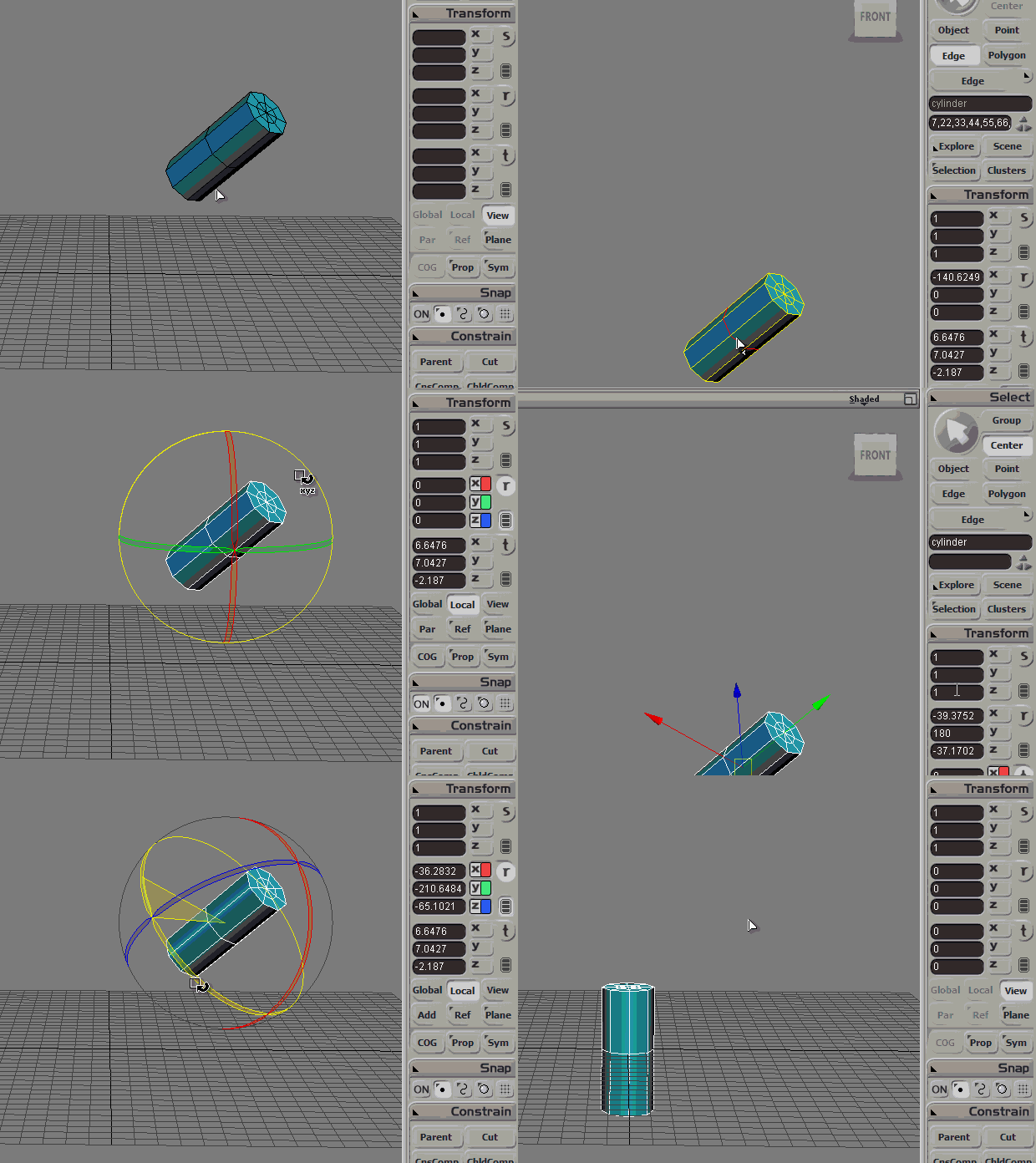
BREAKDOWN:
1. Set an OK center position with "Move Center to Bounding Box" / "Move Center to Vertices".
2. Enter "Center" mode. (top right)
3. Right-click on "Ref" button (below Local) and choose "Pick Polygon/Edge/Point Reference".
Click an object to select it and highlight the desired components.
4. While still in both "Center" and "Ref" modes, reset rotation to 0,0,0 then go back to "Object" mode (top right), go "Local" mode and reset rotation to 0,0,0 again. — That’s it!
ps: The faces need not be in the same object. (It could be another’s!)
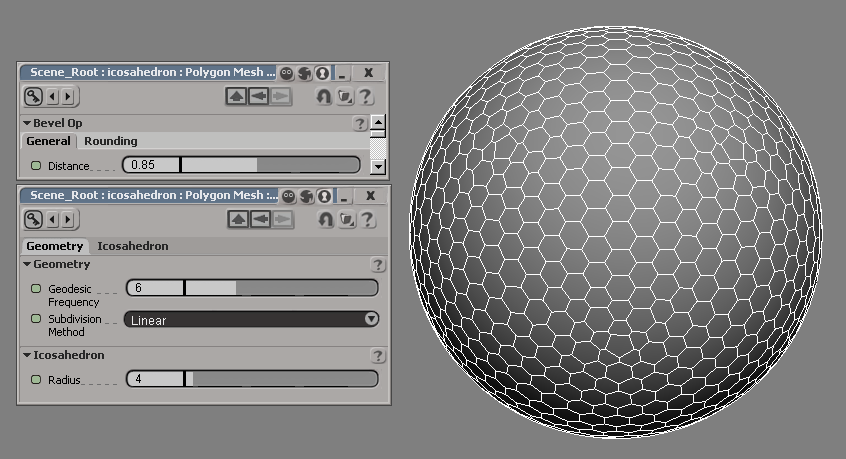
Beveling and/or extruding vertices of an Icosahedron primitive can get you some pretty cool patterns:
You’ve probably heard of ICE keywords like “self“, “this” or “this_model“… but did you know about “this_parent“?
It’s not undocumented, but it’s often forgotten.
If you’ve ever seen a Maya rig, you’ve probably seen their joints system which draws “fake” bones. Fake as in that it’s just an OpenGL virtual representation of the hierarchy/parenting, not an actual object. I’m not a big fan, but I do like the concept of being able to sketch out a skeleton by duplicating and reparenting joints, and thanks to “this_parent” we can do the same in ICE!
What’s the smart way to pick any arbitrary number of items with XSI’s PickElement or PickObject commands? Read below… 😀
si = Application

def pickForever(**kwargs):
    '''
    Pick forever, and ever, and ever, and ever...
    until you rightclick.
    '''

    # Default options
    leftMessage = kwargs.setdefault('leftMsg', 'Pick something')
    middleMessage = kwargs.setdefault('middleMsg', leftMessage)
    selFilter = kwargs.setdefault('selFilter', 'object')

    # Loop and yield forever until complete:
    while 1:
        out = si.PickElement(selFilter, leftMessage, middleMessage)
        obj = out("PickedElement")
        buttonPressed = out("ButtonPressed")
        modifier = out("ModifierPressed")

        if obj:
            yield obj, buttonPressed, modifier
        else:
            break


# _______________________________________
# USAGE EXAMPLES:

def processIndividually():
    '''
    Deal with each pick, one object at a time...
    '''
    for obj, button, modifier in pickForever(leftMsg='Pick Object', selFilter='polygonmesh'):
        button = ['left','middle'][button-1]
        # (-1 because 0 means right, but is never returned.)
        si.LogMessage( "Picked %s with your %s mouse button!" % (obj.FullName, button) )


def listExample():
    '''
    Getting a list of picked objects, only after picking is complete...
    '''
    pickedObjects = zip(*list( pickForever(leftMsg='Pick Object') ))[0]
    si.LogMessage( pickedObjects )


# Cool, eh? :)
I was responsible for rigging the jellyfish (tentacle sim. included) in this commercial for T. Rowe Price, produced by Psyop:
Enjoy! 😀 (Best appreciated in HD.)
Oh and check out the art of this concept artist that worked on it.